!! Try them all, kiddo, that's the beauty of the Linux world: choice !!
"Yeah, and do they do Mayonnaise, too?" would've asked my mother. Let's focus on the important stuff: what's important to you? My wife and I are geeks, the laptop has to be sexy, nerdy, and do all the nerdy things we do with a laptop in a sexy fashion.
FORGET IT
At first, your primary battle is still usability; even though there's been huge progresses, you still just struggle to past beyond the simple point of "Yep, It Boots, we should all be Happy".
I was astonished at first: the piece is cheap @ 1.000usd bought in a remote place like this; with 1gb ram and this 2.1 dual celeron the engine is quite on the high-end scale of the smallish (12.1, feels horribly heavy and wide to us) laptop scale. Well, for the next two months, for sure.
Then some part of the software went really OK, brightness screen on special keys, suspend from lid closed; I had to trick the sound system as expected, and to fiddle with the codecs, but that was still in the range of acceptable burdens of living the Open Source Fantasy.
Where it stopped being nice, is with F7 and F8 unable to accommodate a WPA wireless connection, UBUNTU 8.04 unable to do anything wireless while supporting the webcam out-of-the-box - and no, F9, which does WPA, does not bring the webcam to anything better than 2 frames a MINUTE with the same stk11xx driver.
Aren't we been told that Bug Reports are All-Important, and that it's Our Duty to follow up in order to help the community? I understand the post I left on the Fedora Forums to have overwelmed the modest capacities over there, but I wrote to the devs in their SourceForge Forum TWO weeks ago.
Yikes. It's all about what's important; years ago we'd be weening about having to pass special kernel options just to have a working tty terminal, now we are complaining the webcam is not functional.
Or is it? Yeah, with UBUNTU. Which can't handle wireless because... Just because their code isn't right, since the same applet works in Fedora!
All these people are pulling code from CVS, do their own tweaks to them, and pass it on to the community with rather poor testing. All this bleeding edge stuff that I love (F9 is great for that, LOT's of novelties) are using us as a testing ground for the commercial distros to follow. Even UBUNTU is now talking about an "Increased in Stability and Security Enterprise-Level Solution" (based on their current LTS releases).
So people, wake up: your average openSUSE, Fedora, UBUNTU package is not a free alternative to closed source OS'es in a closed source world; it's using our free time, our expensive hardware, our skills and patience to test for free whatever they are going to put for sale, at a premium, a little bit later.
All for the better in the better of worlds isn't ?
Friday, August 29, 2008


Sunday, July 13, 2008
Asus; the F9 that is, NOT the Eee, Eeee, Eeeeeeee whatever.
ASUS F9E-2P174(F9E-1B2P) (Intel Core 2 Duo T8100 2.1GHz, 1GB RAM, 120GB HDD, VGA Intel GMA X3100, 12.1 inch, PC DOS)

The Good thing: it came WITHOUT windoze, I didn't pay an unwanted license.
The bad thing: this model seems to exist only in Vietnam (bought it in Phnom Penh, since that's where I happen to live)... A copy? Are there fake, full-scale copies of laptops around?
No, it's not: the box was cluttered with the usual amount of fine-printed unusual warnings and other CE notices, this ought to be real.
The keyboard makes "springy" noises, Boing-boing style. It' so annoying I do not even want to write more.
With DualCoreDuo and 2.1Ghz engines on board, it's lightning-fast on my Fedora8 and eats up all its batteries, shutting down without notice, in two hours. Processors can't go underneath 800Mhz, so the two of them just sucks power faster than any useable necessity. I guess that's a side effect of vista. Vista is such a processing power ogre that any 'puter that plans on running it has to have guts. Balls-Burning big guts: It makes a lot of heat too. And the Asus website recommends vista. Pigs. 20 minutes of video at 20% brightness lowered the batteries from 98 to 72%, bang. When I neared 40, it just powered down, not shutted down, without warning.
When my wife saw it, she made "yikes, it's ugly". that's because this 1000USD piece is the final replacement for our 3-times-in-4-year Dead 2000usd 10.1 Vaio, Only one under warranty, for sure: GraphicCard in full short-circuit, thingie fozen, dead. At lest, the Asus has a TWO year warranty, but this keyboard really drives me nuts.
Fedora 8 went quite faultless though, and that merits a mention, both to the manufacturer for complying to current standards, well-established chipsets, and to the 2.6.25 kernel. As a quick list:>
-NO the WebCam DOES NOT work, for sure. What'D'ya think? You High or Something?
-Boot form CD/DVD yes, LiveDisk: Perfect (with that power + 1Gb ram, hey, has to "just work")
-Recognize HDD yes,
-USB yes
-WiFi YES, LAN too
-Correct screen size as soon as installed, 1280x800. Could have gained more in def, like in the 1340 range...
-Some switches fn+ works out of the box, namely Screen Brightness, not Sound though, but Ext Screen seems to work too! (Some really do have strange signs on them, I'd rather not touch them unless I get the near the Manual. The Manual is Home, amd I am some 9.000km away on holidays.
Sound was not working, but as usual a quick look on the UBUNTU forum gave me the solution: These 'newer' ac97 intel chips, the ones they call "HighDefinition" or "HD" needs the full ALSA bundle, and since ALSA is so good, why the heck isn't it the default choice in the first place? Installing Fedora8, I also new that PulseAudio was just giving more trouble than music, that's quite documented too.
I miss an external MuteSound button; there are two Power Buttons though, One for, I guess Suspend and the other for Shut/Down. What else? Keyboard noises sucks.
The Good thing: it came WITHOUT windoze, I didn't pay an unwanted license.
The bad thing: this model seems to exist only in Vietnam (bought it in Phnom Penh, since that's where I happen to live)... A copy? Are there fake, full-scale copies of laptops around?
No, it's not: the box was cluttered with the usual amount of fine-printed unusual warnings and other CE notices, this ought to be real.
The keyboard makes "springy" noises, Boing-boing style. It' so annoying I do not even want to write more.
With DualCoreDuo and 2.1Ghz engines on board, it's lightning-fast on my Fedora8 and eats up all its batteries, shutting down without notice, in two hours. Processors can't go underneath 800Mhz, so the two of them just sucks power faster than any useable necessity. I guess that's a side effect of vista. Vista is such a processing power ogre that any 'puter that plans on running it has to have guts. Balls-Burning big guts: It makes a lot of heat too. And the Asus website recommends vista. Pigs. 20 minutes of video at 20% brightness lowered the batteries from 98 to 72%, bang. When I neared 40, it just powered down, not shutted down, without warning.
When my wife saw it, she made "yikes, it's ugly". that's because this 1000USD piece is the final replacement for our 3-times-in-4-year Dead 2000usd 10.1 Vaio, Only one under warranty, for sure: GraphicCard in full short-circuit, thingie fozen, dead. At lest, the Asus has a TWO year warranty, but this keyboard really drives me nuts.
Fedora 8 went quite faultless though, and that merits a mention, both to the manufacturer for complying to current standards, well-established chipsets, and to the 2.6.25 kernel. As a quick list:>
-NO the WebCam DOES NOT work, for sure. What'D'ya think? You High or Something?
-Boot form CD/DVD yes, LiveDisk: Perfect (with that power + 1Gb ram, hey, has to "just work")
-Recognize HDD yes,
-USB yes
-WiFi YES, LAN too
-Correct screen size as soon as installed, 1280x800. Could have gained more in def, like in the 1340 range...
-Some switches fn+ works out of the box, namely Screen Brightness, not Sound though, but Ext Screen seems to work too! (Some really do have strange signs on them, I'd rather not touch them unless I get the near the Manual. The Manual is Home, amd I am some 9.000km away on holidays.
Sound was not working, but as usual a quick look on the UBUNTU forum gave me the solution: These 'newer' ac97 intel chips, the ones they call "HighDefinition" or "HD" needs the full ALSA bundle, and since ALSA is so good, why the heck isn't it the default choice in the first place? Installing Fedora8, I also new that PulseAudio was just giving more trouble than music, that's quite documented too.
I miss an external MuteSound button; there are two Power Buttons though, One for, I guess Suspend and the other for Shut/Down. What else? Keyboard noises sucks.
Monday, May 12, 2008
AMAROK Fun
Amarok's pissing at my pants. Well, it's just plain pissing me off actually. I now once again remember why I do NOT use it.
An old while ago, I needed a playback interface for a live performance; prior to install on my Laptop, I reviewed what was available on my desktop. I did the same preformance already with the laptop, but it was with UBUNTU 6.06LTS at the time: having my .ogg sounds on the desktop, it was enough to single click on them to start playback in xmms. Fun. Easy. Unbeatable.
In the meantime, I've switched all machines to Fedora7, and XMMS is getting older and older, wasn't behaving the same, and no xmms-special-shortcut-keys package was available as .rpm for Fedora (it's called xmms-itouch); OK, let's try something else.
Target is: play any song that's "at hand" in a single click, no preload, no playlist load, minimal latency between action and sound, single key play, single key stop, single key pause, and the sound has to stop naturally at it's own end, not continue playing the remaining of the folder, list, disc whatever. Well, that's just a setting where you point'n'click to get a sound played and nothing else, it's as simple as that & don't expect any software player to behave like that. Don't.
[End of the story is that I compiled itouch myself since nothing but xmms agrees just to play something without doing/taking any other action]
And what of amarok? The standard in sound processing tools for play/pause, including audacity, is SpaceBar, so I used the amarok shortcuts configurator to point it on spacebar as Play/Pause shortcut. did the job as uch but since it require extra input to stop at end of track or to add a track to a playlist, it wasn't the tool I needed. But nice anyway, with the Covers, Lyrics, Wikipedia lookup and all that.
Since then, I have to choose between listening to music or do some real work when my real work happens not to be playing some music, since every time I hit the spacebar in a text editor a sound start or stops. I've reverted, defaulted, edited the config file as root whatever a 1.000 times, the SpaceBar is now my play/pause shortcut for Amarok. The Music is with Me; for as long as I do not trow this thing out the window.
An old while ago, I needed a playback interface for a live performance; prior to install on my Laptop, I reviewed what was available on my desktop. I did the same preformance already with the laptop, but it was with UBUNTU 6.06LTS at the time: having my .ogg sounds on the desktop, it was enough to single click on them to start playback in xmms. Fun. Easy. Unbeatable.
In the meantime, I've switched all machines to Fedora7, and XMMS is getting older and older, wasn't behaving the same, and no xmms-special-shortcut-keys package was available as .rpm for Fedora (it's called xmms-itouch); OK, let's try something else.
Target is: play any song that's "at hand" in a single click, no preload, no playlist load, minimal latency between action and sound, single key play, single key stop, single key pause, and the sound has to stop naturally at it's own end, not continue playing the remaining of the folder, list, disc whatever. Well, that's just a setting where you point'n'click to get a sound played and nothing else, it's as simple as that & don't expect any software player to behave like that. Don't.
[End of the story is that I compiled itouch myself since nothing but xmms agrees just to play something without doing/taking any other action]
And what of amarok? The standard in sound processing tools for play/pause, including audacity, is SpaceBar, so I used the amarok shortcuts configurator to point it on spacebar as Play/Pause shortcut. did the job as uch but since it require extra input to stop at end of track or to add a track to a playlist, it wasn't the tool I needed. But nice anyway, with the Covers, Lyrics, Wikipedia lookup and all that.
Since then, I have to choose between listening to music or do some real work when my real work happens not to be playing some music, since every time I hit the spacebar in a text editor a sound start or stops. I've reverted, defaulted, edited the config file as root whatever a 1.000 times, the SpaceBar is now my play/pause shortcut for Amarok. The Music is with Me; for as long as I do not trow this thing out the window.
Fedora Bandwidth
Last week-end update of my Fedora7 workstation was 112Mb. This week it was only 95. It's a plain fucking shame. We are not talking Fedora9 Alpha Whatever, no, it's the soon-to-be-discarded F7 that still needs that much of "fixes" or "improvements".
For whatever improvement the end user may notice; after all, when something gets SERIOUSLY bettered, you do notice. Notice articles, weblogs, advertisements, mail announces, shit, you can't miss it. Who in the Linux world doesn't know about kde4? I don't care much, but at least I know that I know. Gimp 2.4 too, great improvements. But it's 2.4 that's great; why the hell did I since had three successive download of the entire package + docs of said Gimp? You are going to tell that I repeat myself but CAN'T THESE PEOPLE WAIT FOR SOMETHING TO BE MATURE BEFORE RELEASING IT?
Well, I could run Debian if I didn't wanted to face these issues. The issue-within-the-issue being that features=modernity, and Hardware-Compliance=modernity too. So you can't just get out of the Upgade-Constantly/Eat-up-all-your-credits mess if you want features. Slack11 with its 2.4 kernel was great but heck, real life people do use USB drives all the time.
And stop bullshitting me with either " Hey that's simple just open a terminal as root and..." or the "Read the manual you moron if you are not good enough go die with shame on your face": that's not helping FOSS. Not at all. I am into FOSS for Political reasons, I don't understand why I have to suffer from bad engineering reasons.
For whatever improvement the end user may notice; after all, when something gets SERIOUSLY bettered, you do notice. Notice articles, weblogs, advertisements, mail announces, shit, you can't miss it. Who in the Linux world doesn't know about kde4? I don't care much, but at least I know that I know. Gimp 2.4 too, great improvements. But it's 2.4 that's great; why the hell did I since had three successive download of the entire package + docs of said Gimp? You are going to tell that I repeat myself but CAN'T THESE PEOPLE WAIT FOR SOMETHING TO BE MATURE BEFORE RELEASING IT?
Well, I could run Debian if I didn't wanted to face these issues. The issue-within-the-issue being that features=modernity, and Hardware-Compliance=modernity too. So you can't just get out of the Upgade-Constantly/Eat-up-all-your-credits mess if you want features. Slack11 with its 2.4 kernel was great but heck, real life people do use USB drives all the time.
And stop bullshitting me with either " Hey that's simple just open a terminal as root and..." or the "Read the manual you moron if you are not good enough go die with shame on your face": that's not helping FOSS. Not at all. I am into FOSS for Political reasons, I don't understand why I have to suffer from bad engineering reasons.
Wednesday, April 23, 2008
VNC Blopper
I am always sorting out what still needs to be done in with all these computers over here so that everything is fine and everybody is happy: Family can watch movies, download music, colleagues can open my files and send me stuff back & so on.
One more of my unuseful sidenotes: a daughter of mine was willing to watch a movie this afternoon, asked for the laptop since the young one was busy watching TV in the mean time... I went it all the way, slipped the disc in, started VLC, passed the Lang & Subtitle menus, went to the movie and pressed the spacebar, Pause. HAnd over the laptop to the kiddo, said "that's it honey, it's paused you'll only got to press the spacebar again to watch your movie" 20 minutes later, I was upstairs & what, the big one is watching her movies on the TV. "Hey kiddo, I asked you to get me the Laptop back downstairs when you finished... But, what are you doin' anyway? She said that it "doesn't worked" and that Mom tried it as well & shot down the machine.
Fuck people, that's about FOSS Advocacy again: So we have a computer where you just CAN'T watch a movie, that's it? I mean, simply slip the disc and push Play? Fuck, that's nuts really.
I sure can watch a movie, but it involves the kind of trickery that nobody else on earth is willing to learn just to watch a movie.
But then, back to my fantasy list; among stuff I thing shoulg go just right is: networking several machines in a single LAN. will give you a glimpse of what I am talking about. The fun part is the one with VLC where you grab someone elses desktop, mouse et al. and toy around from your station, that's too fun. Kids love it and, when you do have kids not even able to play a DVD by themselves, it can be useful. It's over-the-shoulder peering too, there isn' much privacy left for your target. Still, it can do stuff when it comes to Remote Graphic Administration, and would be a great tool to monitor the Web actuvity of kids in a classroom fdor instance.
And Now, Ladies & Gents, for the Blopper: try to switch down the remotemachine and it will crash as soon as you confirm. /bang. Must have something to do with the way itloses connection; frozen hard I can tell. To switch off, you have to do like with ssh: /sbin/shutdown -h -P now
One more of my unuseful sidenotes: a daughter of mine was willing to watch a movie this afternoon, asked for the laptop since the young one was busy watching TV in the mean time... I went it all the way, slipped the disc in, started VLC, passed the Lang & Subtitle menus, went to the movie and pressed the spacebar, Pause. HAnd over the laptop to the kiddo, said "that's it honey, it's paused you'll only got to press the spacebar again to watch your movie" 20 minutes later, I was upstairs & what, the big one is watching her movies on the TV. "Hey kiddo, I asked you to get me the Laptop back downstairs when you finished... But, what are you doin' anyway? She said that it "doesn't worked" and that Mom tried it as well & shot down the machine.
Fuck people, that's about FOSS Advocacy again: So we have a computer where you just CAN'T watch a movie, that's it? I mean, simply slip the disc and push Play? Fuck, that's nuts really.
I sure can watch a movie, but it involves the kind of trickery that nobody else on earth is willing to learn just to watch a movie.
But then, back to my fantasy list; among stuff I thing shoulg go just right is: networking several machines in a single LAN. will give you a glimpse of what I am talking about. The fun part is the one with VLC where you grab someone elses desktop, mouse et al. and toy around from your station, that's too fun. Kids love it and, when you do have kids not even able to play a DVD by themselves, it can be useful. It's over-the-shoulder peering too, there isn' much privacy left for your target. Still, it can do stuff when it comes to Remote Graphic Administration, and would be a great tool to monitor the Web actuvity of kids in a classroom fdor instance.
And Now, Ladies & Gents, for the Blopper: try to switch down the remotemachine and it will crash as soon as you confirm. /bang. Must have something to do with the way itloses connection; frozen hard I can tell. To switch off, you have to do like with ssh: /sbin/shutdown -h -P now
Friday, April 04, 2008
tons of screens
A GLMatrix screensaver thnigy is doing the background image in Enlightenment DR16:
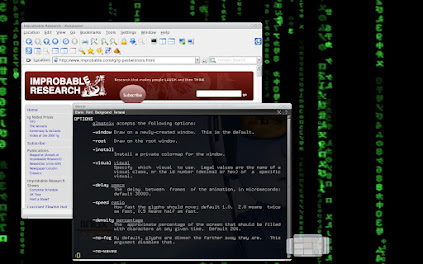
Let's get the same, but at 80% opacity!
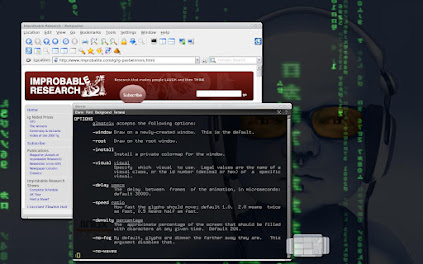
That's not much my style to just fill some webspace just to show activity, but I've been screen-capturing lot's of stuff &, what, let's share:
The Real-Life-Use of a good little hack: a terminal, transparent, set below: nice, usefull, so much funkier than the usual terminal... E16 always.
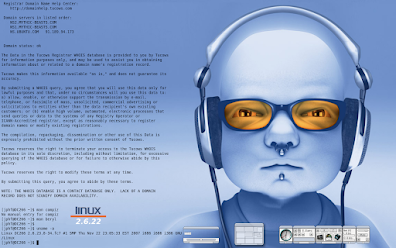
While the Transparent-Terminal-As-Background is really cool & is part of my everyday environnement now, even if I change 'bout anything else...

Yo people, That's it. Use' E DR16 & nothing else!
[well, yes, it seems I am back on E16 now. Bye Raster, Hi Kwo!
Let's get the same, but at 80% opacity!
That's not much my style to just fill some webspace just to show activity, but I've been screen-capturing lot's of stuff &, what, let's share:
The Real-Life-Use of a good little hack: a terminal, transparent, set below: nice, usefull, so much funkier than the usual terminal... E16 always.
While the Transparent-Terminal-As-Background is really cool & is part of my everyday environnement now, even if I change 'bout anything else...
Yo people, That's it. Use' E DR16 & nothing else!
[well, yes, it seems I am back on E16 now. Bye Raster, Hi Kwo!
Wednesday, January 09, 2008
Killing Distros by the Dozen
Where is the fun here, ladies & gents ? I am a true apostle of Open Source Software; since I cannot code I do contribute to Documentation writing, I test innocuous stuff & report back to the maintainers. As a start, what was thrilling was the corpus of stuff to learn, the seemingly endless possibilities of tailor-made your system with sometimes chill-in-the-spine Root potentially destructive operations.
Now when you look at it straight in the face, openSUSE, UBUNTU, Fedora & al. would probably install flawlessly on your computer; They will not ask you one thousand questions during install (UBUNTU has become a really Slip-the-Disk & Forget operation as of now) so gone ois this part of the tweaking. That leaves you with the robustness of a secure, forgiving system that is open to (much more obscure) tweaks afterwards, if you gain the knowledge, if you raise the question, if you can afford the time spent. 'Cause otherwise, today's distro compared to 3 years ago feels much like the switch from W95 to XP, where you stood in control, and responsible if you brake something within 95/98/Me & became some kind of minor disturbance to the operating system that would re-paste the Not-To-Delete-Files for you after you knowingly deleted them because you don't need them: To hack XP you needed special tools, bruteforce-like. Ubuntu, but not only U, feels a lot like that today, whit the differenvce that SUPPOSEDLY everything is there under the hood, but you are somewhat discouraged from opening the bonnet. Think AppArmor, SELinux and such: we are not talking Secure Tools here, but Dumb-Proofed software because it is now intended for the masses. All the better says the advocate in me, while the LEGO fanatic thinks: Where's the fun ? The DIY ? In only two years of experience, things have become so tasteless, distros fight only on Shininess of Spalsh Screens & number of recognized WiFi cards...
Now when you look at it straight in the face, openSUSE, UBUNTU, Fedora & al. would probably install flawlessly on your computer; They will not ask you one thousand questions during install (UBUNTU has become a really Slip-the-Disk & Forget operation as of now) so gone ois this part of the tweaking. That leaves you with the robustness of a secure, forgiving system that is open to (much more obscure) tweaks afterwards, if you gain the knowledge, if you raise the question, if you can afford the time spent. 'Cause otherwise, today's distro compared to 3 years ago feels much like the switch from W95 to XP, where you stood in control, and responsible if you brake something within 95/98/Me & became some kind of minor disturbance to the operating system that would re-paste the Not-To-Delete-Files for you after you knowingly deleted them because you don't need them: To hack XP you needed special tools, bruteforce-like. Ubuntu, but not only U, feels a lot like that today, whit the differenvce that SUPPOSEDLY everything is there under the hood, but you are somewhat discouraged from opening the bonnet. Think AppArmor, SELinux and such: we are not talking Secure Tools here, but Dumb-Proofed software because it is now intended for the masses. All the better says the advocate in me, while the LEGO fanatic thinks: Where's the fun ? The DIY ? In only two years of experience, things have become so tasteless, distros fight only on Shininess of Spalsh Screens & number of recognized WiFi cards...
Killing the First One: Ubuntu
As ranted earlier, U install didn't offer me the flexibility I wanted in the Hard Disk Mount/Format during said install. On the whole, I think Gnome is tasteless and the brownish theme just sucks (albeit I praise them for departing from the usual ubiquitous blueish that seems unavoidable since W3.1). It's a shame truly, since U has a core of fanatics that makes it the best forum around, and by far, I swear out of experience. I still hang there when I look for an answer, although I run an RPM based distro. Their aim was to seduce the mass; unsurprisingly that's the moment when an older population, nearer to the debut of the distro will step away, waving "Safe Trip" at the enthusiastic crowds coming aboard while we are leaving.
Some of us seems build like that; anything revered by more than 0.1% of the population just becomes less exiting.
So exit the tasteless Golf Rabbit of them all, the mighty U despite its community that so fierce you'd be sure someone, somewhere, would have attempted, documented and achieved anything you could dream of doing on your system. Exit the best software manager around (Synaptic) and its 17.000-some
available softwares...
Some of us seems build like that; anything revered by more than 0.1% of the population just becomes less exiting.
So exit the tasteless Golf Rabbit of them all, the mighty U despite its community that so fierce you'd be sure someone, somewhere, would have attempted, documented and achieved anything you could dream of doing on your system. Exit the best software manager around (Synaptic) and its 17.000-some
available softwares...
Killing some more, but faster: Gentoo, Slackware, Debian
Gentoo never made it to X; thanks globally to the same usual issue regarding my 8800 Nvidia and the 1440x900 screen - although, it just NEVER made it, even in any safe mode. I am getting tired of the "No Screen Defined" warning, especially when you have one defined. They (Who "They3 ? 'Haven't got a clue; me maybe given the FOSS context) should re-work some of these messages. Debian played it even dumber, not recognizing one out of three perfectly identical HDD's; beside, it's the only one, if I remember well, that didn't hook itself to my Linksys router...
But all this is old news, kind of: in both cases, I re-downloaded (I am doing it again, right now) fresh install discs, wiped clean 2 partitions & srtarted all over since then; with same, lame result.
And then, on my somewhat trusty Fedora running Enlightenment with mostly KDE apps, I worked. Yeah, this happens; And I took some holidays even: The island of Bali seriously lack computers, at least where I went - namely volcanoes and coral reefs; I didn't really notice their absence to be honest.
And I came back, full of energy: I want Slackware to do what I want, not what Volkerding's decided! And I want Gentoo too! And it's been 3 full months since I haven't hacked a single config file, and the pile of .txt helpfiles printed at the time has gained serious dust on the corner of my desk...
Aiming at removing engage as Login Manager to switch back to the native KDE slackware provided, I realized I had forgot it all. Time, job, a bit of marine & mountain exhilaration has erased it clean, and I don't feel like going over it all over again; I'll stick to the mainstream, they are boring, sometimes dangerous (Fedora and it's Bleeding-Edge obsession!) resource-hungry (compiz! Glad I run E! Bandwidth!) but the other ones, the ones I praise for working the way I want just are too much for me.
Please nevertheless write down somewhere that even Slackware in it's r12 flavor started doing strange things with the .rc and init files, and coming from r11 I found a lot of classic stuff to be missing from their traditional place in r12. Fedora is even worse on this aspect though, with all the startup scripts being hidden somewhere and the full .rc architecture completely empty; same applies for the Kernel Sources that require a separate download & need you to build a mirror tree in your user account to be able to compile you own kernel... Shite.
Allright ladies and gents, it's getting late here & I don't feel I aw writting anything woth of awything anyway, so G'day to you in the Happy FOSS World.
But all this is old news, kind of: in both cases, I re-downloaded (I am doing it again, right now) fresh install discs, wiped clean 2 partitions & srtarted all over since then; with same, lame result.
And then, on my somewhat trusty Fedora running Enlightenment with mostly KDE apps, I worked. Yeah, this happens; And I took some holidays even: The island of Bali seriously lack computers, at least where I went - namely volcanoes and coral reefs; I didn't really notice their absence to be honest.
And I came back, full of energy: I want Slackware to do what I want, not what Volkerding's decided! And I want Gentoo too! And it's been 3 full months since I haven't hacked a single config file, and the pile of .txt helpfiles printed at the time has gained serious dust on the corner of my desk...
Aiming at removing engage as Login Manager to switch back to the native KDE slackware provided, I realized I had forgot it all. Time, job, a bit of marine & mountain exhilaration has erased it clean, and I don't feel like going over it all over again; I'll stick to the mainstream, they are boring, sometimes dangerous (Fedora and it's Bleeding-Edge obsession!) resource-hungry (compiz! Glad I run E! Bandwidth!) but the other ones, the ones I praise for working the way I want just are too much for me.
Please nevertheless write down somewhere that even Slackware in it's r12 flavor started doing strange things with the .rc and init files, and coming from r11 I found a lot of classic stuff to be missing from their traditional place in r12. Fedora is even worse on this aspect though, with all the startup scripts being hidden somewhere and the full .rc architecture completely empty; same applies for the Kernel Sources that require a separate download & need you to build a mirror tree in your user account to be able to compile you own kernel... Shite.
Allright ladies and gents, it's getting late here & I don't feel I aw writting anything woth of awything anyway, so G'day to you in the Happy FOSS World.
Fedora survived, but for how long ?
Indeed folks; Now given the pace at which I update this thing, well yes I've been involved in real-world issues & spend a tad less time fooling around with this computer. To be fair, I spend an awful lot of time doing Lego Technic with the kids though.
Fedora survived, and yet on the moto (already advertised) of "Download More, Get Less". Scrambling the forums, I found this dependency issue to have been spotted already; the LiveCD is faulty, not me.
Guess what ? I downloaded the full DVD, over a 64kbps link, over the course of 5 nights... After that at least I got an install, fought the usual fight with xorg.conf for which it seems that anything not 1024x768 in VESA mode is utterly exotic & far too much bleeding edge for not crashing upon, and ended up with (several xorg.cong backups) no I mean, a usable distro that as soon as the update daemon kicked in gently proposed me with a mere 680mb of updates. Hmmpf. This took three more days for sure; I noticed that everything was VERY up-to-date, very, incredibly so...
And that's the summary of today's Fedora: @ release 7 I am already outdated, but anyway you can be sure that they will feed you around 100megs of updates a week. Don't kid me folks, if kernel 2.6.23 is out one week and an update is posted with a new kernel the following week, that's not only due to the massive core of acute developers out there dedicating their every single minute of lifetime into coding new, better, on the edge stuff: there's a FULL FUCKING LOT OF BUGSOLVING over there. Have a look for yourself, my fellow *nix-ers: everytime a major stuff get a major release (OO.org, firefox, the kernel,...) there'll be full versions to re-download several times in the following three or more weeks; my bet is that on one side they are not ready but nevertheless there is a pressure into increasing the release figures, which leads to the other hand: they don't test enough, check enough & find horrendous bugs as soon as the stuff is out in the open for real.
Fedora survived, and yet on the moto (already advertised) of "Download More, Get Less". Scrambling the forums, I found this dependency issue to have been spotted already; the LiveCD is faulty, not me.
Guess what ? I downloaded the full DVD, over a 64kbps link, over the course of 5 nights... After that at least I got an install, fought the usual fight with xorg.conf for which it seems that anything not 1024x768 in VESA mode is utterly exotic & far too much bleeding edge for not crashing upon, and ended up with (several xorg.cong backups) no I mean, a usable distro that as soon as the update daemon kicked in gently proposed me with a mere 680mb of updates. Hmmpf. This took three more days for sure; I noticed that everything was VERY up-to-date, very, incredibly so...
And that's the summary of today's Fedora: @ release 7 I am already outdated, but anyway you can be sure that they will feed you around 100megs of updates a week. Don't kid me folks, if kernel 2.6.23 is out one week and an update is posted with a new kernel the following week, that's not only due to the massive core of acute developers out there dedicating their every single minute of lifetime into coding new, better, on the edge stuff: there's a FULL FUCKING LOT OF BUGSOLVING over there. Have a look for yourself, my fellow *nix-ers: everytime a major stuff get a major release (OO.org, firefox, the kernel,...) there'll be full versions to re-download several times in the following three or more weeks; my bet is that on one side they are not ready but nevertheless there is a pressure into increasing the release figures, which leads to the other hand: they don't test enough, check enough & find horrendous bugs as soon as the stuff is out in the open for real.
Let's take a short break from today's rants:

For a change, here comes one more of my 'shots. Admire the dire simplicity of Enlightenment DR16 (Yes, again, yes) running an idea I found on ubuntu-unleashed which proposed an overcomplicated way of getting your terminal becoming your background; well it took me three clicks with the mouse here to realize the same & I must recon this blogger to have pushed forward a very graphic, neat idea that puts the black terminal of death, boring and dull, right into your colorful, spinning (for compiz) or sliding (with E DR16) desktop. That's (fake) integration, but at its best & most fun.
Wednesday, September 12, 2007
A Quickie on Debian (and UBUNTU)
OK so the Fedora thing is flawed, mostly because the live disk not handling dependancies properly I agree, but yet I had to look in another direction.
A felt confident: Fedora7 was only the first of several distros on my desk awaiting to set itself on my new PC; reviewing them & choosing the best fit was supposed to be 80% pleasure and 20% learning interesting things.
Well, I learned some, indeed:
Debian install is exactly the same as the old ubuntu, prior to the live disk with an install icon on the desktop present favored strategy. Debian never reached my network hub, acknowledged only 2 out of three perfectly identical sata drives, and never entered Graphic Mode, saying in an error message that some xorg.conf file was faulty "no screen defined" - so far, OK, lets give it a look: at least I know where xorg.conf is (in /etc/X11), and I had the older desktop with openSUSE to compare with. Well, nothing was missing I am afraid to say, every item being defined & referenced in a seemingly logical way... sure some parameters where not the same, the very name of the items differing but straightforward... then, when it installed GRUB the bootloader on the HDD, it did not spotted FEDORA but only XP that the computer shop installed (for free, hum) on this new machine. Not only did I waste my time, but as well my previous install, grrrrrrrr.
So, we all know that debian is a great tool for others to develop on (and is always slightly late), so lets hop on to ubuntu 7.04, the most modern, up to date thingy, the one that's targeted to dumb users also. ubuntu, in live disk mode, was a tiny bit above: it gave me a graphical environnement, no network and three hard disks at least. Without the network, I dropped the ball since the fedora disk operated perfectly with my integrated network card, I assume it's not _that_ exotic. If ubuntu aims at being the easiest on earth, well, they have some way to go, still.
Enough for today, I am struggling with mounting permissions to be able to write to my other partitions in a fresh Fedora install. I tend to think I'll have to wait for openSUSE 10.3 to be released...
Always ready to try...
Sometimes slightly discouraged.
A felt confident: Fedora7 was only the first of several distros on my desk awaiting to set itself on my new PC; reviewing them & choosing the best fit was supposed to be 80% pleasure and 20% learning interesting things.
Well, I learned some, indeed:
Debian install is exactly the same as the old ubuntu, prior to the live disk with an install icon on the desktop present favored strategy. Debian never reached my network hub, acknowledged only 2 out of three perfectly identical sata drives, and never entered Graphic Mode, saying in an error message that some xorg.conf file was faulty "no screen defined" - so far, OK, lets give it a look: at least I know where xorg.conf is (in /etc/X11), and I had the older desktop with openSUSE to compare with. Well, nothing was missing I am afraid to say, every item being defined & referenced in a seemingly logical way... sure some parameters where not the same, the very name of the items differing but straightforward... then, when it installed GRUB the bootloader on the HDD, it did not spotted FEDORA but only XP that the computer shop installed (for free, hum) on this new machine. Not only did I waste my time, but as well my previous install, grrrrrrrr.
So, we all know that debian is a great tool for others to develop on (and is always slightly late), so lets hop on to ubuntu 7.04, the most modern, up to date thingy, the one that's targeted to dumb users also. ubuntu, in live disk mode, was a tiny bit above: it gave me a graphical environnement, no network and three hard disks at least. Without the network, I dropped the ball since the fedora disk operated perfectly with my integrated network card, I assume it's not _that_ exotic. If ubuntu aims at being the easiest on earth, well, they have some way to go, still.
Enough for today, I am struggling with mounting permissions to be able to write to my other partitions in a fresh Fedora install. I tend to think I'll have to wait for openSUSE 10.3 to be released...
Always ready to try...
Sometimes slightly discouraged.
Sunday, September 09, 2007
Fedora 7 Gallore - Get Less by downloading More !
Hi there technofreaks that may happen to stumble on this part of the webverse.
We bought ourselves a new machine, which for sure is intended to run Linux. I used my holidays in Europe to buy a good graphic card (they are unavailable in Cambodia) & I simply set up the rest here locally. For the detail-hungry around: dual core 2.66Ghz, 2Gb Ram, 256Mb nVidia 8600GTS, a dvd writer and a reader, 3 sata disks of 160Gb and that's it, if you add the widescreen asus flat monitor. the motherboard came with 5.1 sound and 1Gb Ethernet as standard. But for the graphic thingy, most everything is ASUS, and I am happy with the chinese case slightly bigger than atx format, but bundled with 4 (four!) fans. I added a 650w power supply, from china as well alas but it was the only one to offer a separate 12v outlet for the graphic card as recommended.
While I was in Europe, I toured my friends with highspeed internet to grab the latest in available distros; among them, Fedora now at 7 (got debian, gentoo and slack 12 as well, more on this later).
Let's get to the point: slipping the live disk fired the thing, network recognized, screen def too low but correct in its widescreen settings... and not much more. For the end user that's not completely dumb, while remaining an end user without any other aim in mind, I kept my opinion about one thing: it's definitely the window manager of choice that gives you the taste of a system, and you'd have to dig further than the average normal desktop usage to feel the difference in flavour from one distro to another. In this case, Gnome is the one available, with xfce and kde in need of further download to be available.
Right now, I am on xfce which is definitely sleeker than gnome. But, for sure, I am downloading Enlightenment DR17 as I write.
So, where's the Flavour, the one I read on the Fedora forums as "you'll either Love it or Hate it": well, I don't Love or Hate fedora, and I can at least say that some of the info I found was wrong. I would assume that a distro specificity, the thing that distinguish itself from the others (in my order of preference), are:
- The way you can tweak it's behaviour, it's parameters,
- The workability right-out-of-the-box, then the workability as such, as a production tool,
- The Community around,
- The stability, the confidence it builds with the user,
- It's credible perspective of survival.
On tweaking, we are still tied to the window manager of choice, with gnome spreading it's various settings among three sub-menus, with duplicates here and there. So it's a downpoint here, as opposed to openSUSE, there is no Settings Central to be found, unless you opt for xfce which have their own. for looks at least.
Workability: No openoffice, nothing non open source (means my screen looked shit without nvidia drivers). you sure have a software installer, so it's down to bandwith... the YUM package manager is overly simplistic, doesn't give you a clue on the size of the package you attempt to retrieve, nor a timeframe or even a resizeable progress window to help you get the idea by yourself... Waited a bit, crashed it several times by attempting to download in one shot all my usual bundle, stumbled upon unreachable repositories, waited for ages in front of "resolving dependencies" message &, finally, got OpenOffice downloaded and quoted as available. Sure, you even had it appearing in your Menu. Click, nothing, not even an error message; grinning, I fire up a terminal and enter the manual command for the spreadsheet editor "oocalc" - the terminal at least displays messages, and this one told me than some lib-something.so.whatever was missing. Downpoint: they do have a problem with dependency calculations in Fedora, if a well documented software fails to install with all it needs. There must be a failure of me somewhere though, I con't believe OpenOffice not to work in Fedora...
More on this later, including:
A Word on Eye Candy, Compiz & looks/speed + which drivers to use:
We bought ourselves a new machine, which for sure is intended to run Linux. I used my holidays in Europe to buy a good graphic card (they are unavailable in Cambodia) & I simply set up the rest here locally. For the detail-hungry around: dual core 2.66Ghz, 2Gb Ram, 256Mb nVidia 8600GTS, a dvd writer and a reader, 3 sata disks of 160Gb and that's it, if you add the widescreen asus flat monitor. the motherboard came with 5.1 sound and 1Gb Ethernet as standard. But for the graphic thingy, most everything is ASUS, and I am happy with the chinese case slightly bigger than atx format, but bundled with 4 (four!) fans. I added a 650w power supply, from china as well alas but it was the only one to offer a separate 12v outlet for the graphic card as recommended.
While I was in Europe, I toured my friends with highspeed internet to grab the latest in available distros; among them, Fedora now at 7 (got debian, gentoo and slack 12 as well, more on this later).
Let's get to the point: slipping the live disk fired the thing, network recognized, screen def too low but correct in its widescreen settings... and not much more. For the end user that's not completely dumb, while remaining an end user without any other aim in mind, I kept my opinion about one thing: it's definitely the window manager of choice that gives you the taste of a system, and you'd have to dig further than the average normal desktop usage to feel the difference in flavour from one distro to another. In this case, Gnome is the one available, with xfce and kde in need of further download to be available.
Right now, I am on xfce which is definitely sleeker than gnome. But, for sure, I am downloading Enlightenment DR17 as I write.
So, where's the Flavour, the one I read on the Fedora forums as "you'll either Love it or Hate it": well, I don't Love or Hate fedora, and I can at least say that some of the info I found was wrong. I would assume that a distro specificity, the thing that distinguish itself from the others (in my order of preference), are:
- The way you can tweak it's behaviour, it's parameters,
- The workability right-out-of-the-box, then the workability as such, as a production tool,
- The Community around,
- The stability, the confidence it builds with the user,
- It's credible perspective of survival.
On tweaking, we are still tied to the window manager of choice, with gnome spreading it's various settings among three sub-menus, with duplicates here and there. So it's a downpoint here, as opposed to openSUSE, there is no Settings Central to be found, unless you opt for xfce which have their own. for looks at least.
Workability: No openoffice, nothing non open source (means my screen looked shit without nvidia drivers). you sure have a software installer, so it's down to bandwith... the YUM package manager is overly simplistic, doesn't give you a clue on the size of the package you attempt to retrieve, nor a timeframe or even a resizeable progress window to help you get the idea by yourself... Waited a bit, crashed it several times by attempting to download in one shot all my usual bundle, stumbled upon unreachable repositories, waited for ages in front of "resolving dependencies" message &, finally, got OpenOffice downloaded and quoted as available. Sure, you even had it appearing in your Menu. Click, nothing, not even an error message; grinning, I fire up a terminal and enter the manual command for the spreadsheet editor "oocalc" - the terminal at least displays messages, and this one told me than some lib-something.so.whatever was missing. Downpoint: they do have a problem with dependency calculations in Fedora, if a well documented software fails to install with all it needs. There must be a failure of me somewhere though, I con't believe OpenOffice not to work in Fedora...
More on this later, including:
A Word on Eye Candy, Compiz & looks/speed + which drivers to use:
Subscribe to:
Posts (Atom)

 Posts
Posts

